
Ignored paths
By default, every push to a connected branch deploys. Ignored paths let you list files that should not cause a deployment, so a change to README.md, the docs folder, or your CI configuration does not rebuild the application.
A push is skipped only when every file it changed matches an ignored path. If even one other file changed, the push deploys as usual.
Set ignored paths
- Open the service environment and select Settings.
- Expand Advanced settings.
- In the Ignored paths card, type a path or pattern and select Add, or press Enter. You can also select a suggestion under Quick add.
- Remove a path with the ✕ on its chip.
- Select Save.
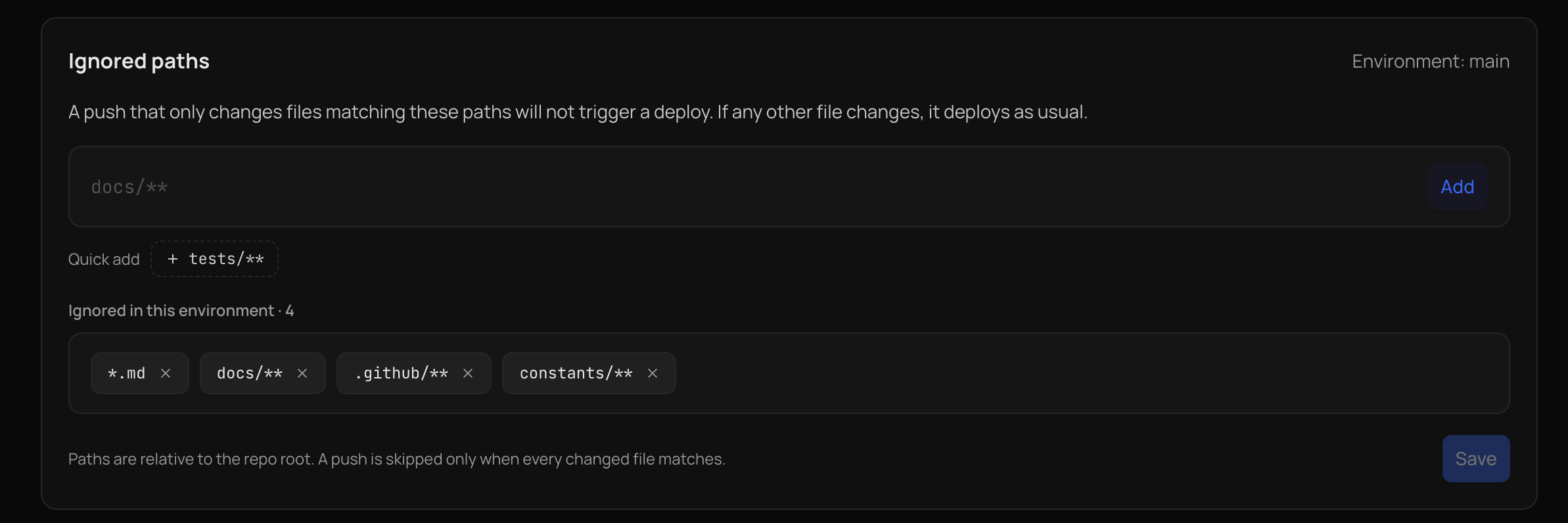
Ignored paths belong to one environment, so each branch has its own list. Saving only stores the list. It never starts a deployment. With an empty list, every push deploys.
Write a path
Paths are relative to the repository root and are written like lines in a .gitignore file.
| Pattern | Matches |
|---|---|
docs/** |
Everything under the docs folder at the repository root. |
*.md |
Markdown files at any depth, such as README.md and docs/guide.md. A pattern without a / matches a file or folder name at any depth. |
.github/** |
CI workflows and other GitHub configuration. |
docs/ |
A folder named docs at any depth, and everything under it. |
src/legacy |
That file or folder, and everything under it. |
src/*.py |
Python files directly in src, but not in its subfolders. * never crosses a /. |
**/fixtures/** |
A fixtures folder at any depth. |
Rules:
- A leading
./or/is dropped, because every path is already relative to the repository root. - Paths are case-sensitive.
- A path cannot contain spaces or
.., and cannot start with!. - You can add up to 50 paths, each at most 200 characters.
For example, with *.md and docs/** ignored, a push that changes README.md and docs/setup.md is skipped, and a push that changes README.md and src/app.py deploys.
When a push still deploys
Kuberns skips a push only when it is sure which files changed. A push deploys when:
- Any added, changed, or deleted file does not match an ignored path.
- The push contains 20 or more commits. GitHub reports at most 20 commits per push, so the list of changed files may be incomplete.
- A commit lists no changed files. This includes an empty commit made with
git commit --allow-empty, which makes it a way to ask for a deployment on purpose. GitHub also often lists no files for a merge commit, so a pull request merged with Create a merge commit deploys even if it only changed ignored files. Squash and rebase merges create normal commits and are checked as usual. - Kuberns cannot tell which files changed.
What a skipped push does
- Nothing is built, and no build or activity entry is created for the push.
- The change is not lost. The next deployment, or the Deploy button, builds the latest commit of the branch, including everything that was skipped.
- A deployment that is already running is not cancelled.
- The push does not count towards the daily limit of Git push deployments on a free trial.
Ignored paths only affect Git pushes. Saving environment variables or build settings, the Deploy button, and rollbacks are not affected.
Notes
- Ignored paths apply to pushes from GitHub. See Deploy on push.
- Template deployments do not have ignored paths.
- Anyone with access to the environment can see the list. Users who can edit the environment's configuration can change it. Everyone else sees it read-only.